How to retrieve MMS images from the Solutions By Text platform
Pre-condition: To retrieve an image from the SBT server, the retriever’s system IP(s) MUST be whitelisted on the SBT side. Please contact SBT team to whitelist the IP address(es)
SBT clients can use the following URL to retrieve images:
https://ui.solutionsbytext.com/SbtWeb/mms/DownloadImage?file=”Imagefilename”&apikey=”API key of the tenant”
Parameters
file
– File name of the image received as MMS, which can be found in the callback URL [Message] parameter or Inbound Report
apikey
– API key of the layer from where MMS image is being retrieved.
Return Values
– Image save popup is displayed
Example
Callback URL parameters;
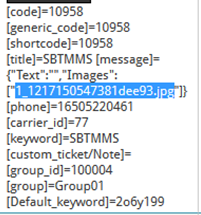
Final URL will look like the following:

Note: Only one image can be retrieved at a time using the above API url